

View Frequently Asked Questions
WHAT IS CONVERGE+
The Smarter Way to Capture Leads and Measure Event Success
What is Converge+?
Converge+ is your event lead capture and attendee insights platform, combining easy-to-use lead scanning with powerful data and AI-driven insights to help your team engage prospects, prioritize follow-up, and maximize event ROI.
How does Converge+ help my team follow up after the event?
Converge+ combines lead information, notes, recordings, and engagement activity in one place so your team can prioritize follow-up and export leads after the event.
Is there a demo or trial version available?
Yes. You can request a demo or preview of Converge+ by contacting AXN.ES@airportxnews.com
Is there a demo or trial version available?
Yes. You can request a demo or preview of Converge+ by contacting the Exhibitor Services team at AXN.ES@airportxnews.com
ORDERS & LICENSING
Manage Scan Licenses for Your Team
How do I know how many Scan licenses my company has?
What is the deadline to purchase additional licenses?
Additional licenses can be purchased up until the event. We recommend purchasing early to allow time for setup and team assignment.
Can I transfer a purchased license to another employee?
Are unused licenses refundable?
No. Unused licenses are non-refundable.
I need to cancel my order. Can I be refunded?
Refunds are subject to event policies and timing. Please contact your Exhibitor Services Manager at AXN.ES@airportxnews.com
SETUP & ACCESS
Get Set up Quickly and Confidently
How quickly can I get set up before an event?
The setup takes just a few minutes.
Once your company admin receives access, they can:
- Assign scan licenses to onsite team members (required)
- Add up to 3 Lead Qualifying Questions (optional)
- Create customized email templates for personalized outreach (optional)
- Review and add products (optional)
Access to Converge+ Scan setup will be available on January 24, 2027.
When will I have access to do my setup?
You’ll have access to Converge+ Scan setup starting on January 24, 2027.
Your company admin will receive an email from Airport Experience Conference Converge+ with the subject line: “Action Required: Complete Your Converge+ Setup”.
What if I didn’t receive the setup instructions email?
Check your spam folder for an email from Airport Experience Conference Converge+ with the subject line: “Action Required: Complete Your Converge+ Setup”.
If unable to locate, contact AXN.ES@airportxnews.com to confirm company admin status and request a resend.
Who is my company admin?
Can I change my company admin?
Do I have to complete setup?
Does someone need to be registered before I can assign them a license?
Do I need to purchase a separate device?
SCAN & LEAD CAPTURE
Capture Every Lead with Confidence
Do I need to download a separate app?
How do I start scanning?
All licensed users will receive details to download the Converge+ Scan app on February 28, 2027. Once logged into the app, simply click the round button with the scan icon to scan a badge.
What if I don’t have Wi-Fi or cell service on the show floor?
No problem — Wi‑Fi isn’t required for scanning. The Converge+ Scan app works in offline mode, so you can scan badges, manually enter leads, and add notes even without a connection.
We recommend going online at the start and end of each day to sync your leads to the Insights dashboard. Some features are limited while offline, but your core lead capture still works.
Can multiple people share one Scan login?
Can I manually add a lead if someone does not have a badge?
Yes, if someone doesn’t have a badge you can manually add them or scan their business card using the “additional scanning methods” option in the Converge+ Scan app.
Note: Manually entered leads do not sync to the Insights dashboard.
Can I make voice notes or record conversations?
Yes, with attendee consent, Converge+ allows you to capture recorded conversations – as well as voice notes – to help personalize your follow-up and improve lead quality.
Is attendee consent required for recording conversations?
Yes. You must obtain verbal consent before recording any conversation. The Converge+ Scan app includes a prompt to help facilitate this.
What happens after I scan a badge?
You can view all your scans on your Converge+ Scan homepage to review and edit notes or contact information. The data is sent to your Converge+ Insights dashboard, where it’s aggregated with notes and recordings.
Can other members of my company see the leads I scan?
No. Leads remain visible only within the scanner that captured them. However, all scanned leads are aggregated in the Insights dashboard for reporting and exporting.
Can the company admin see leads from every scanner?
Company admins cannot view activity within an individual scan license. Once leads sync to Insights, the company admin can review all aggregated data in the dashboard.
Can I edit or delete a lead after scanning?
Some information, such as notes and additional contact details, can be edited after scanning. Attendee contact details, provided during registration, can only be updated by the attendee. Leads cannot be deleted after scanning.
What happens if I accidentally scan someone twice?
The lead will appear twice in the Converge+ Scan app, but it will only appear once in Insights.
How do I know my offline scans have synced?
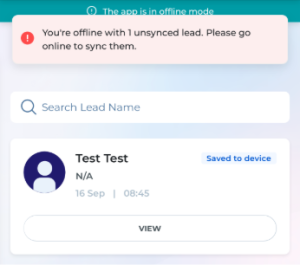
Offline scans are labeled “Saved to device” until they sync. A banner at the top of the app shows how many leads still need to be synced and provides instructions to connect to the internet.
Can I send follow-up emails directly from the app?
Yes. You will be able to send follow-up emails directly through the Converge+ Scan app when you click on the lead. You can customize these emails during the setup process.
Can I add attachments to auto-generated emails?
Yes, you can attach files and edit the auto-generated emails before sending.
How long do I have access to the Scan tool?
You’ll get access to the Converge+ Scan app on February 28, 2027.
Lead capture remains available for 24 hours after the event ends. After that, you can no longer scan new leads or add lead data.
You will still have access to view your existing leads in the Converge+ Scan app for 4 weeks after the event. We recommend using the Converge+ Insights dashboard to review, filter, and export your leads.
What support is available during the event?
Visit the Converge+ Support Desk onsite for assistance with setup, access, scanning, or lead retrieval.
INSIGHTS & EXPORTS
View, Export, and Analyze Your Leads
When will I receive access to my leads?
On day one of the exhibit hall, the company admin will receive an email with your Insights dashboard access from Airport Experince Confernce Converge+ with the subject line: “Your [Event Name] Converge+ Insights Dashboard Is Ready”.
You’ll have access for 30 days after the event closes with Insights Basic.
Upgrade your Insights experience with audience segmentation, Ideal Customer Profile (ICP) matching, engagement analytics, and enhanced reporting. Contact AXN.ES@airportxnews.com to learn more about available upgrade options.
What if I didn’t receive the Insights access email?
Check your spam folder first for an email from Airport Experience Confernce Converge+ with the subject line: “Your Airport Experience Confernce Converge+ Insights Dashboard Is Ready”
If unable to locate, contact AXN.ES@airportxnews.com to assist.
What insights and features are included in the Insights dashboard?
Converge+ Insights Basic gives you access to your event leads in one centralized dashboard. View lead details, review information captured through Converge+ Scan, apply basic filters, and export your lead data for follow-up.
Looking for deeper insights? Upgraded Insights plans include features like Ideal Customer Profile (ICP) matching, custom audience segmentation, engagement analytics, and enhanced reporting. Contact AXN.ES@airportxnews.com if you’re interested in learning more about upgrades.
What kind of data will I receive?
Can I export my leads and notes?
Yes. You can download your leads as a CSV file from your Converge+ Insights dashboard.
Can I send follow-up emails from the dashboard?
No. Currently, follow-up emails can only be sent through the Converge+ Scan app. However, you can export your leads and send your own emails.
What if I’m missing some of my leads data?
Please reach out to AXN.ES@airportxnews.com for assistance.
What security measures are in place to protect lead data?
Data security is our top priority. All badge scans are encrypted, and our system prevents unauthorized third-party access. Converge+ is GDPR-compliant and follows industry best practices for data privacy. Data stays secure from capture to dashboard upload.
Still have questions?
Contact your Exhibitor Services Team at AXN.ES@airportxnews.com